NIUBI Partition Editor Professional Edition

Reliable Disk Partition Manager Software

For Windows 11/10/8/7/Vista/XP (32 & 64 bit)

30% to 300% Faster Than Other Tools
Unique 1-Second Rollback Data Protection

NPE Professional

NIUBI Partition Editor Professional Edition is a powerful partition software for Windows 11, 10, 8, 7, Vista, and XP (32 & 64 bit). It is an all-in-one disk partition management toolkit.

As the safest partition manager, NIUBI Partition Editor Professional Edition helps you to:

  • Shrink, extend, move, and merge partitions to optimize disk space without losing data.
  • Fix file system errors and defragment partitions to improve computer performance.
  • Scan disk partitions to check for bad sectors, and copy disk partitions to migrate data.
  • Create, delete, format, hide, activate, convert, wipe partitions, and much more.

Reviews

Resize/Move Partition

Resize volume

Resize Partition

What should you do when the system C: drive or any data volume becomes full? Spend a long time starting over? NO! NIUBI Partition Editor helps you resize existing partitions easily and safely.

  • Shrink a volume and generate unallocated space on either side.
  • Extend a volume by taking free space from other partitions.
  • Advanced technologies to protect your system and data.
  • Simply click, drag, and drop on the disk map.
  • 30%–300% faster than other tools.

Move Partition

Drag and drop to move partition with contiguous unallocated space without data loss.

Merge Partitions

Combine two adjacent partitions into a larger one by several clicks without losing data.

Copy & Convert

Convert Disk Partition

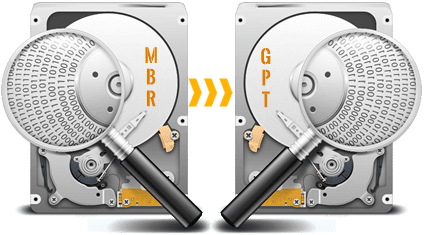
Windows or some applications require a specific type of hard disk or partition. NIUBI Partition Editor can convert disks and partitions without losing data.

  • Convert an MBR disk to GPT.
  • Convert an NTFS partition to FAT32.
  • Convert a Primary partition to Logical.
  • Convert a Logical partition to Primary.
  • All with just a few clicks.

Convert

Copy Disk Wizard

File-system-level fast cloning of the entire disk to migrate the operating system and data.

Copy Volume

Clone single partition to back up data or migrate to another larger disk.

Data Security

Data Security

Erase Data

After you delete files or delete/format a partition, the files may still be recoverable with professional tools. NIUBI Partition Editor can completely erase sensitive data to prevent recovery.

  • Wipe an entire hard disk.
  • Wipe a single partition.
  • Wipe unallocated space.
  • Simple and military-level algorithms.

Hide Volume

Hide a partition from File Explorer to prevent important data from unauthorized access. Easily unhide it whenever you need.

Set Read-Only

Set the read-only attribute on a hard disk to prevent files from being modified without authorization.

Disk Partition Management

Create Volume

Create new partitions with free unallocated space, offering more options than Disk Management.

Format Volume

Format an existing partition to use it as a new drive. (All files will be lost)

Change Drive Letter

Add or change the drive letter of a partition, such as C, D, E, etc.

Set Active

Mark a partition as Active to make it bootable for Windows OS.

Clean Up Disk

This function removes all partitions and de-initializes the disk so it can be used as new.

Delete Volume

Delete an entire hard disk or a single partition if you no longer need them.

Change Label

Add a new label or modify the name of a partition for easier identification.

View Properties

Check detailed parameters of a disk or partition.

Change Status to Offline

Set a hard disk to offline status.

Initialize Disk

A new hard disk should be initialized before creating partitions and saving files.

System Optimization

Scan

Surface Test

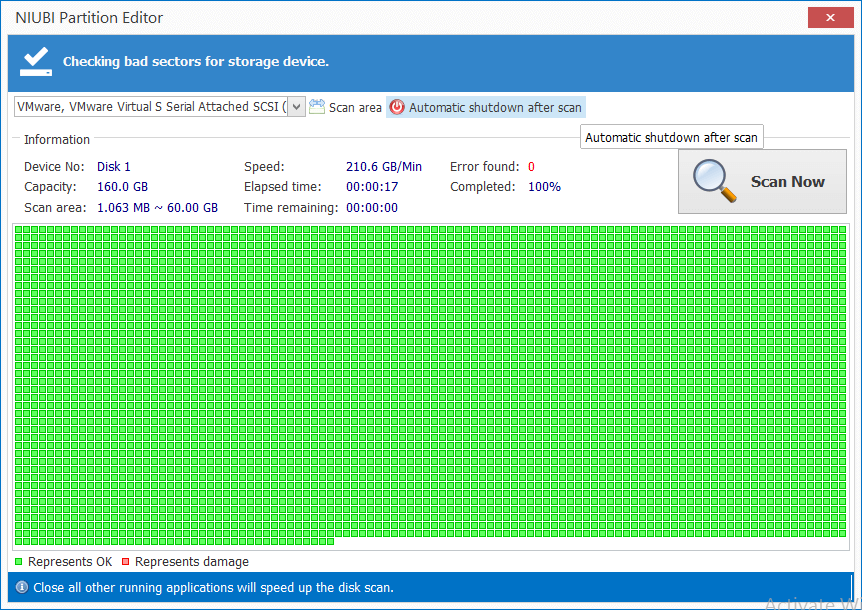
Bad sectors are damaged areas that have lost the ability to write or retrieve data. They can corrupt your saved data and slow down your computer. The Surface Test can scan a single partition or an entire disk to check for bad sectors.

Check Volume

Check and repair error to ensure file system integrity.

Defragment

Defrag to improve the partition read and write efficiency.

Why NIUBI Partition Editor

1 Second Rollback

Automatically reverts the computer to its original state in a flash if any software or hardware issue occurs while modifying disk partitions.

Cancel-at-will

If you perform an incorrect operation, you can cancel the ongoing process at any stage instantly without losing data.

Bootable Media

Create a bootable CD, DVD, or USB drive with just a few clicks.

Features

Virtual Mode

The operations you perform will be listed as pending. No real disk partition will be modified until you click Apply to confirm.

Extremely Fast

A unique file-moving algorithm helps resize and move partitions 30% to 300% faster than other tools.

All-in-One Toolkit

Most of your disk and partition management needs can be fulfilled.

Download to test, only 13MB, 100% clean. DOWNLOAD

Select Edition

  • Professional Edition
    1 Year Free Upgrade
  • All functions
  • Windows 11/10/8/7/Vista/XP
  • x

BUY NOW

  • Professional Edition
    Lifetime Free Upgrade (20% off)
  • All functions
  • Windows 11/10/8/7/Vista/XP
  • x

BUY NOW

  • Server Edition
    1 Year Free Upgrade
  • All functions
  • Windows 11/10/8/7/Vista/XP
  • Windows Server 2003 - 2025

BUY NOW

100% 90-Day money back guarantee, 24/7 live chat support.

What Customers Say

Within 20 minutes of using your program the problem was fixed and now my old win7 desktop has enough free space again.

- Mc Johnson (USA)

Found your site and tried your partition manager and it worked in literally 4 seconds! Awesome work.Thank you very much.

- Sakula (Japan)

I used the software this evening on a new windows 10 laptop. It worked great, solved my problem only in about five minutes.

- James Carter (UK)

We are trusted by

IBM   FedEx   IEEE   Comcast   HP   BOEING   Adidas