NIUBI Partition Editor Enterprise Edition

#1 Enterprise Disk Partition Manager Software

For Windows Server & PC (32 & 64 bit)

30% to 300% Faster Than Other Tools
Unique 1-Second Rollback Data Protection

for Unlimited computers

Enterprise Edition

NIUBI Partition Editor Enterprise Edition is designed for medium and large organizations. It supports Windows Server 2025, 2022, 2019, 2016, 2012, 2008 and Windows 11/10/8/7/Vista/XP. Local/removable hard disks, VMware/Hyper-V virtual machines, and all types of hardware RAID arrays are supported.

This edition can be registered on  unlimited PCs and servers belonging to your organization regardless of the locations. This enterprise disk partition manager helps you shrink, extend, move, and merge partitions to optimize disk space usage without losing data. Clone disk partitions to back up or migrate data without server interruption. Convert disk and partition types without losing data, among many other features.

Reviews

Why NIUBI Partition Editor

Virtual Mode

The operations you perform will be listed as pending for preview, and real disk partitions will not be modified until you click Apply to confirm.

Virtual Mode

Cancel-at-Will

If you applied incorrect operations, you can manually cancel all ongoing operations at any progress before completion in a flash.

Cancel-at-Will

1-Second Rollback

Automatically reverts disks and partitions to their previous state in a flash if an unexpected interruption or any known error is detected.

1-Second Rollback

All-in-One Toolkit

Most of your disk partition management requirements can be fulfilled.

Save Costs

Allows installation on unlimited computers and servers within your organization to save costs.

Portable & Bootable

Besides the setup version, you can run the portable program or create a bootable USB drive.

Resize/Move Partitions

Resize partitions

Resize Partition

What should you do when the system C: drive or any data volume becomes full? Spend a long time starting over? No! NIUBI Partition Editor helps you resize existing partitions easily and safely.

  • Shrink a volume and generate Unallocated space on either side.
  • Extend a volume by taking free space from other volumes.
  • Advanced technologies to protect your system and data.
  • Simply click, drag, and drop on the disk map.
  • 30%–300% faster than other tools.

Move Partition

Drag and drop to move partitions and contiguous Unallocated space without data loss.

Merge Partitions

Combine two adjacent partitions into a larger one with just a few clicks without losing data.

Clone & Convert

Convert Disk Partition

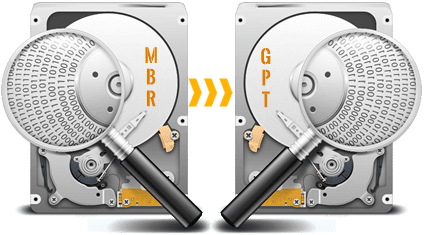
Windows or some applications require a specific style of hard disk or partition volume. NIUBI Partition Editor can convert disks and partitions without losing data.

  • Convert an MBR-style disk to GPT.
  • Convert an NTFS partition to FAT32.
  • Convert a Primary partition to Logical.
  • Convert a Logical drive to a Primary partition.
  • All of this can be done with just a few clicks.

Convert

Clone Disk

Perform a fast, file system-level clone of the entire disk to migrate the Operating System and data.

Copy Volume

Clone a single partition to back up data or migrate to another larger disk.

Data Security

Data Security

Erase Data

After deleting files or formatting a partition, the files may still be recoverable with professional tools. NIUBI Partition Editor can completely erase sensitive data to prevent recovery.

  • Wipe data on an entire disk, a single partition, or Unallocated space.
  • Simple and military-level algorithms.

Hide Volume

Hide a partition from File Explorer to prevent important data from unauthorized access. Easily unhide it whenever you need.

Set Read-Only

Set the read-only attribute on a hard disk to prevent files from unauthorized modification.

Disk Partition Management

Create Volume

Create new partitions with Unallocated space, offering more options than Disk Management.

Format Volume

Format an existing partition to use it as a new drive. (All files will be lost)

Change Drive Letter

Add or change the drive letter of a partition, such as C, D, E, etc.

Set Active

Mark a partition as Active to make it bootable for Windows OS.

Clean Up Disk

This function removes all partitions and de-initializes the disk to use it as new.

Delete Volume

Delete an entire hard disk or a single partition if it is no longer needed.

Change Label

Add a new label or modify the name of a partition for easier identification.

View Properties

Check detailed parameters of a disk or partition.

Change Status to Offline

Set a hard disk to offline status.

Initialize Disk

A new hard disk should be initialized before creating partitions and saving files.

System Optimization

Scan

Surface Test

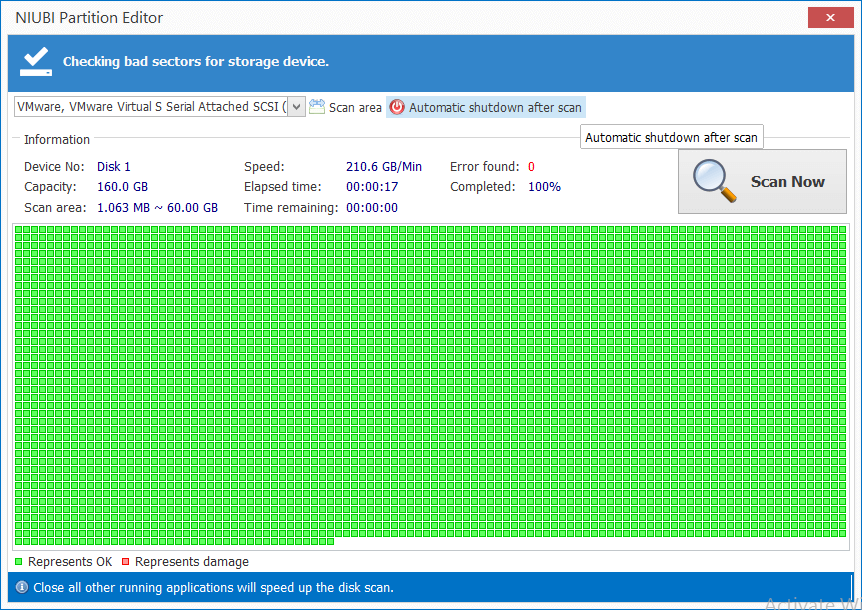
Bad sectors are damaged areas that have lost the ability to write or retrieve data. They can corrupt your saved data as well as slow down your computer. The Surface Test can scan a single partition or an entire disk to check for bad sectors.

Check Volume

Check and repair errors to ensure file system integrity.

Defragment

Defrag to improve the partition read and write efficiency.

Advanced Editions

  • Enterprise Edition
    Plus 2 Year Free Upgrade
  • Upgrade to all latest versions for free in 2 years.

BUY NOW

  • Enterprise Edition
    Plus Lifetime Free Upgrade
  • Upgrade to all latest versions for free in lifetime.

BUY NOW

  • Technician Edition
    Include Lifetime Free Upgrade
  • Provide profitable services for unlimited clients.

BUY NOW

100% 90-day money-back guarantee, 24/7 live chat support.

What Customers Say

Within 20 minutes of using your program the problem was fixed and now my old win7 desktop has enough free space again.

- Mc Johnson (USA)

Over 20 years experience, I know the risk resizing a drive, this is why I selected your editor software, correct decision!

- Michel (UK)

Amazing program! Your partition editor prevented a disaster on one of our servers. It resized the drives successfully in just 10 minutes.

- Johnson (Australia)

We are trusted by

IBM   FedEx   IEEE   Comcast   HP   BOEING   Adidas